Search
English
English
Chinese
Instruments
Lock-in Amplifier
Source Measure Unit
Optical Chopper
Power Amplifier
Pre-amplifier
Current Source
Teaching Laboratory System
Applications
Optical Experiment
Electrochemistry
Sensing Measurements
Scanning Probe Microscopy
Materials Science
Biomedicine
Impedance
Support
Download
Q&A
Customer Care
Resources
Customer Evaluation
Customer List
Company
About Us
History
IPR
News
Exhibition
Contact Us
Join Us
What are you looking for?
EN
English
Chinese
Home
Instruments
Instruments
Lock-in Amplifier
Source Measure Unit
Optical Chopper
Power Amplifier
Pre-amplifier
Current Source
Teaching Laboratory System
Applications
Applications
Optical Experiment
Electrochemistry
Sensing Measurements
Scanning Probe Microscopy
Materials Science
Biomedicine
Impedance
Support
Support
Download
Q&A
Customer Care
Resources
Resources
Customer Evaluation
Customer List
Company
Company
About Us
History
IPR
News
Exhibition
Contact Us
Join Us
Email Us
Search
Optical Chopper
Single-/dual-frequency chopper with selectable multi-blade configurations Equipped with high-precision phase-locked loop, supports measurement from 1 Hz to 10 kHz.
Contact Us
Home
Instruments
Optical Chopper
All
Lock-in Amplifier
· Single Channel
· Dual Channel
· Multi Channel
· Module
Source Measure Unit
· Source Measure Unit
Optical Chopper
· Optical Chopper
Power Amplifier
· Multi-channel high-voltage Power Amplifier
Pre-amplifier
· Current Amplifier
· Voltage Amplifier
Current Source
· OE4201 Current Source
Teaching Laboratory System
· Teaching Laboratory System
Optical Chopper
Optical Chopper
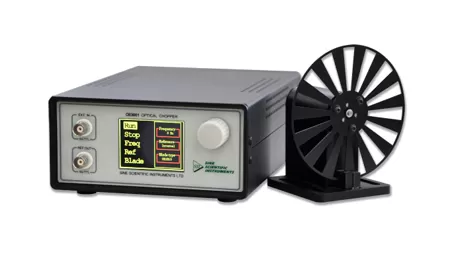
OE3001-Optical Chopper
1 Hz-10 kHz chopping frequencies
Various types of blade options
High-precision phase-locked loop
LCD display with single encoder control
USB remote control interface
With external trigger control mode
TTL/CMOS level input & output
Learn More
Latest News From SSI
01
The CPS Fall Meeting 2026
02
The 87th JSAP Autumn Meeting 2026
03
Sine Scientific Instruments Partners with Qosain Scientific to Expand Footprint in the South Asian Scientific Instrument Market
+86 20 84133345
Contact Us
+86 20 84133345
/
+1 781 218 9688
sales@ssi-instrument.com
* Type of Request
Product information
Technical support for a purchased product
Other
* By submitting this form, you are providing SSI Instruments with your personal data.
To know how we use it and what choices you have, please read our
Privacy Policy
.
Your browser does not support VBScript!